Project Euler Solutions


Mathematics and computing are not separate disciplines - they are two lenses on the same underlying structure. Project Euler sits at that intersection: problems that look like puzzles but reward the kind of thinking that distinguishes an engineer from a programmer. The right algorithm does not just run faster; it reveals why brute force was never the right question.
This repository is a record of that journey. Where multiple approaches were tried, all are sometimes kept: the naïve solution alongside the elegant one, because the contrast is the lesson.
The framework around the solutions is deliberate. Problems are fetched, solutions are scaffolded and benchmarked, and later problems are encrypted – all from a single interactive/web shell. An incorporated AI agent enables reflection and learning: explore alternatives after solving a problem, translate Python to C for a performance comparison, or articulate the mathematical insight in plain language.
The point never is to get an answer but to understand why it is the answer.
In accordance with Project Euler's guidelines, solutions and notes after the first 100 problems are encrypted; for collaboration on those, please follow the instructions in the Key Exchange section of the User Guide.
Highlights
- Interactive shell - a
prompt-toolkitREPL with persistent history, tab-completion,{name}variables, and aloop <list>: <block>construct over problem lists. - Web front end - a browser terminal (xterm.js over a real
solverPTY), a problem viewer, and an in-browser editor, served publicly over HTTPS. - Transparent encryption - solutions for #101+ are encrypted at rest with AES-256-GCM under one master key, which each holder keeps sealed to their own key pair.
- AI assistance - a single-shot
claude-apiand agentic Claude Code, both aimed at deepening understanding rather than skipping it. - Scraping & benchmarking - problems are fetched from projecteuler.net, then scaffolded, benchmarked, and recorded - a personal history of the journey.
Documentation
The framework is documented in guides under docs/, plus the
authoritative command-language spec:
| Guide | For | Covers |
|---|---|---|
| User Guide | using the shell | launching, command blocks, variables, loops, the command catalogue, key exchange |
| Solver Guide | solving problems | the @runner.main decorator, test cases, the solve workflow |
| Developer Guide | extending the framework | the @register contract, command modules, the module loader |
| Command Index | reference | every command's aliases, flags, and exact usage |
| Language reference | the command language | surface syntax, canonical form, semantics |
| Config Guide | configuration | the two conf files, precedence, and what is deliberately not a setting |
| Package Guide | the code's packaging | the three packages, extensions and overlays, login and role, versions, deploying |
| Tooling Reference | make and scripts | every make target and every script, one line each (generated) |
The cryptography has a guide per scheme — the mathematics, and how this project uses it:
| Guide | Covers |
|---|---|
| Git Filter Guide | transparent encryption of solutions/private/ — clean/smudge, the master key |
| Vault Guide | envelope encryption of ~/.euler — Argon2id, AES-GCM, session-key delivery |
| SRP Guide | SRP-6a web login — the verifier, the handshake, mutual proof |
| Secret Sharing Guide | Shamir thresholds and the 2-of-2 master-key split (key-split / key-reconstruct) |
The command catalogue and command index are regenerated from the live registry by the
update-docs shell command - solver-host "update-docs" after changing any command's name,
alias, help, or usage (solver-host "update-docs --check" fails if they are stale); see the
Package Guide § 3.4 for why it is solver-host.
This README covers everything outside those guides: installation, dependencies, and the design notes.
Installation
Prefer not to install? A live instance of the web front end runs at euler.vikasmunshi.com - the same
solvershell, documentation viewer, and editor, all in the browser and served over HTTPS. Signed out, you can read the first 100 solutions, the docs and the blog articles; the terminal, the editor and the encrypted solutions need an account (see the web server guide). If you'd like one to explore or collaborate, reach out. To run your own copy, see the installation steps below.
Clone the repository and install system dependencies via make or the bash scripts;
the framework itself is installed with pip. Solutions can be written in any language – anything that runs as a
script or compiles to a binary will work.
The setup scripts and Makefile use apt and are tailored for Debian-based systems (Ubuntu). They are also
configured for Python and C, which is what I primarily use – feel free to adapt them for your own
OS, languages, and toolchains.
one-line install (curl)
curl -fsSL https://raw.githubusercontent.com/vikasmunshi/euler/master/install.sh | bash
By default this clones to ~/euler and runs make install-all. To choose a different path:
curl -fsSL https://raw.githubusercontent.com/vikasmunshi/euler/master/install.sh | bash -s -- --dir ~/projects/euler
or, install using make
git clone https://github.com/vikasmunshi/euler.git
cd euler
make --version >/dev/null || sudo apt install build-essential
make install-all      # system deps + venv + all groups + git hooks + completions
source .venv/bin/activate
solver
Use make install-minimal instead to skip dev tools, AI dependencies, git hooks, and completions.
or, install using scripts and pip
git clone https://github.com/vikasmunshi/euler.git
cd euler
./scripts/setup/dev_env.sh install python primesieve c
./scripts/setup/chrome.sh install
python3.14 -m venv .venv
source .venv/bin/activate
pip install -e "packages/solver[show,solutions]"   # add ai,dev groups for full install
# the web tier, only on a host that serves it:
#   pip install -e packages/site -e packages/webshell
solver
Requirements - Python 3.14+ and optional dependency groups
Python 3.14+ and the dependencies declared in
packages/solver/pyproject.toml, split into optional groups -
install only what you need:
| Group | Contents | When you need it |
|---|---|---|
| (base) | argon2-cffi, beautifulsoup4, cryptography, flake8, mypy, prompt-toolkit, python-dotenv, requests, rich, types-requests |
using the solver framework |
solutions |
cython, mpmath, numpy, primesieve, setuptools |
running some solutions |
show |
matplotlib, PyQt5 |
graphical output (--show) |
ai |
anthropic |
the Claude API commands (claude-api, claude-batch) |
dev |
autoflake, autopep8, black, isort |
lint --auto-fix and solution formatting |
The web front end is not a group but two further packages, installed only on a host that serves it (see the Package Guide):
| Package | Adds |
|---|---|
euler-site |
aiohttp, aiohttp-jinja2, jinja2, markdown-it-py, nh3, pillow, pygments (+ euler-solver) |
euler-webshell |
nothing beyond euler-solver and euler-site, pinned in lockstep |
System packages (apt: Python 3.14, primesieve, the C toolchain) are recorded in the root
pyproject.toml and installed by scripts/setup/dev_env.sh.
Quick start
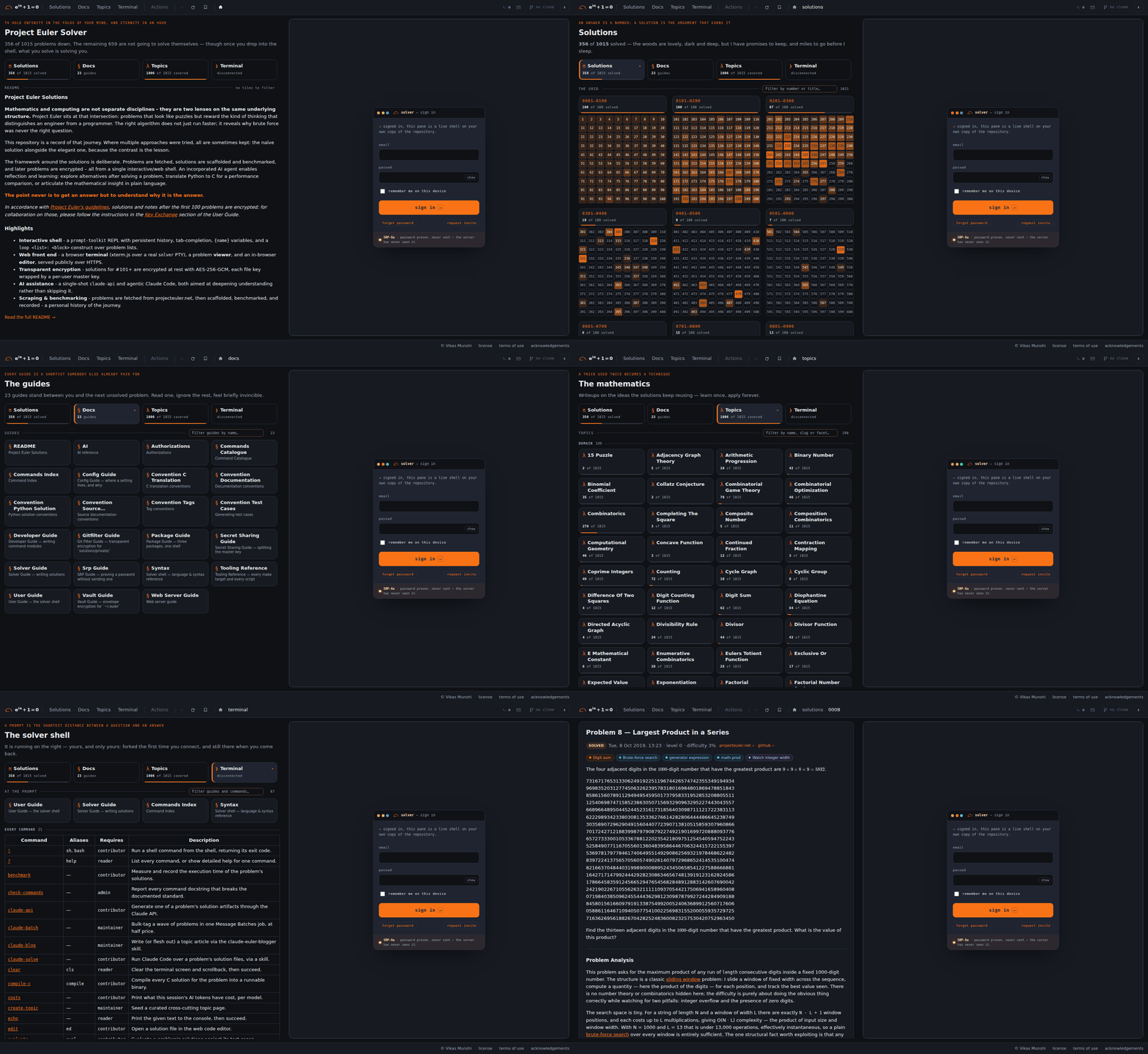
The web front end, signed out: / → /solutions/ → /docs/ → /blogs/ → /shell → /solutions/8/, 3 seconds each.
$ solver
╭─ ▎ solver ───────────────────────────────────────────────────────────────────────────────────────────╮
│                                                                                                      │
│  SOLVER  v2                                                                                          │
│    Your Euler problem solving companion in the terminal                                              │
│    Powered by claude.ai · prompt-toolkit · rich                                                      │
│                                                                                                      │
│    start with ls [number|next|random], then eval / benchmark                                         │
│    ? help                                                                                            │
│                                                                                                      │
╰──────────────────────────────────────────────────────────────────────── type exit or Ctrl-D to quit ─╯
▎ ❯ loop {solved}: {
▎ ·   benchmark {loop.number} --silent || break;
▎ ·   }
Launch the interactive terminal with solver (or python -m solver); the same shell is also served in the
browser by the web front end.
Type ? for the command list, ? <cmd> for usage, and exit / Ctrl-D to quit. solver can also
be driven non-interactively by passing a quoted command block (solver "eval 42; benchmark 42"), exiting with the
block's status. The full workflow - new, eval, benchmark, mark - is in
the User Guide and Solver Guide;
the Command Index lists every command.
A note on the AI assistance: two complementary paths are wired into the shell, both
aimed at deepening understanding rather than skipping it - the single-shot
claude-api (generate a solution, notes, or test cases) and the agentic
claude-solve / claude-blog / ! claude (Claude Code working directly on a problem's solution
files, or on a blog article). The API path needs the ai dependency group and an
ANTHROPIC_API_KEY; Claude Code needs only the signed-in claude CLI; see the
User Guide for the trade-offs.
For the nerds
-
Interactive shell -
prompt-toolkit-based REPL with persistent history, auto-suggest, tab completion (including bash-native completion for!-prefixed commands),{name}variables and side-effect-free expressions (comparisons, arithmetic, indexing/slicing, safe builtins), and aloop <list>: <block>construct over sliceable problem lists ({problems},{solved},{unsolved}). The command language - surface syntax, canonical form, and semantics - is specified indocs/syntax.md. -
Rich UI -
richpanels, tables, and a themed colour palette throughout, so the terminal output is as readable as a rendered page. -
Web front end - a deployed stack of isolated
aiohttpservices behind a TLS edge, bringing three concerns into one page: a browser terminal (xterm.js over a PTY running a realsolvershell), a viewer that assembles each problem's page - statement, notes, and benchmark results - on the fly, and an in-browser editor that saves, evaluates, and deletes a problem's solution files. Each collaborator gets their own system user, home, clone, and encrypted vault;make deploy-webdeploys it anddocs/web-server-guide.mddocuments it. -
Hosted over HTTPS - the web front end is served publicly at euler.vikasmunshi.com. Caddy terminates TLS and reverse-proxies to the app tier over unix sockets, loading a Let's Encrypt certificate that acme.sh issues and auto-renews through a name.com DNS-01 challenge (no inbound port 80), and a dynamic-DNS timer keeps the name pointed at the host's current address. Signed-out visitors read a public, read-only site served from a packaged copy of the public content; everything else is gated at the edge by browser-side SRP-6a login (the password never crosses the wire), and each collaborator gets their own system user, home, repo clone, and encrypted vault, with a profile (reader / contributor / maintainer / admin) deciding which commands and routes they may use. See the web server guide for the full design and
make deploy-webto deploy it.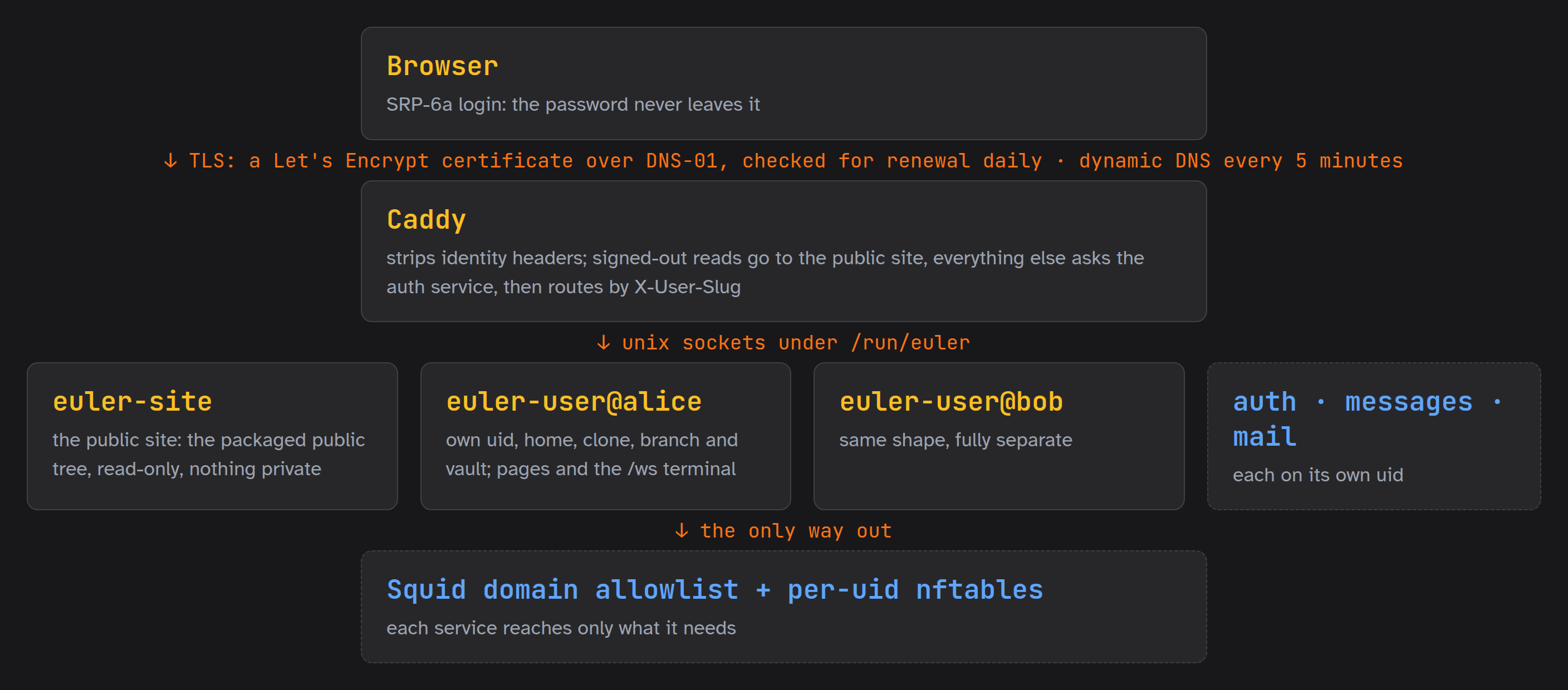
-
Problem scraping - fetches and caches problem statements directly from projecteuler.net; no manual copy-paste.
-
Solution evaluation - subprocess-based test harness with configurable timeouts, result recording, and support for any language that compiles or runs as a script.
-
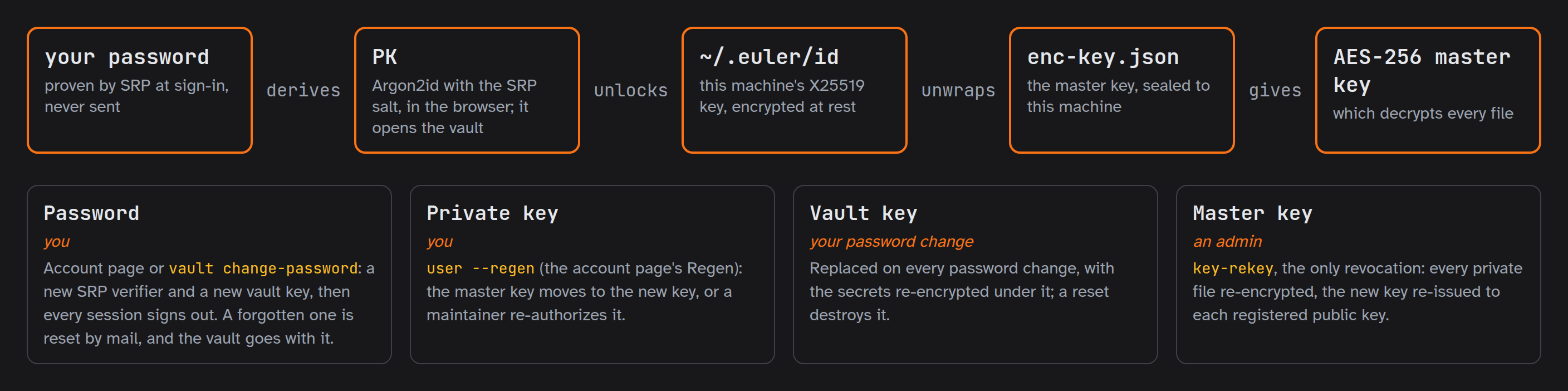
Transparent encryption - solutions for #101+ are encrypted at rest with AES-256-GCM by a git clean/smudge filter, under one master key; each file's nonce is an HMAC of its plaintext, so an unchanged file encrypts to the same bytes and git sees no churn. Each holder keeps the master key sealed to their own X25519 key (ephemeral ECDH + HKDF-SHA256 + ChaCha20-Poly1305), and it is delivered whole or as a 2-of-2 Shamir split, so no single message carries all of it.
-
AI Agents - two paths to an agentic assistant:
- the single-shot Claude API (
claude-api py|c|notes|test-cases) for solutions and documentation, - and full Claude Code driven from the shell both interactively (
! claude) and headless:claude-solve <problem> solve|review(theclaude-euler-solverskill) andclaude-blog <blog>(theclaude-euler-bloggerskill), each stopping at a local commit; - API token costs per
solversession are tracked, use the commandcoststo show.
- the single-shot Claude API (
-
Performance dashboard - benchmarks solutions and records execution times, building a personal history of the journey through the problems.
architecture & package layout
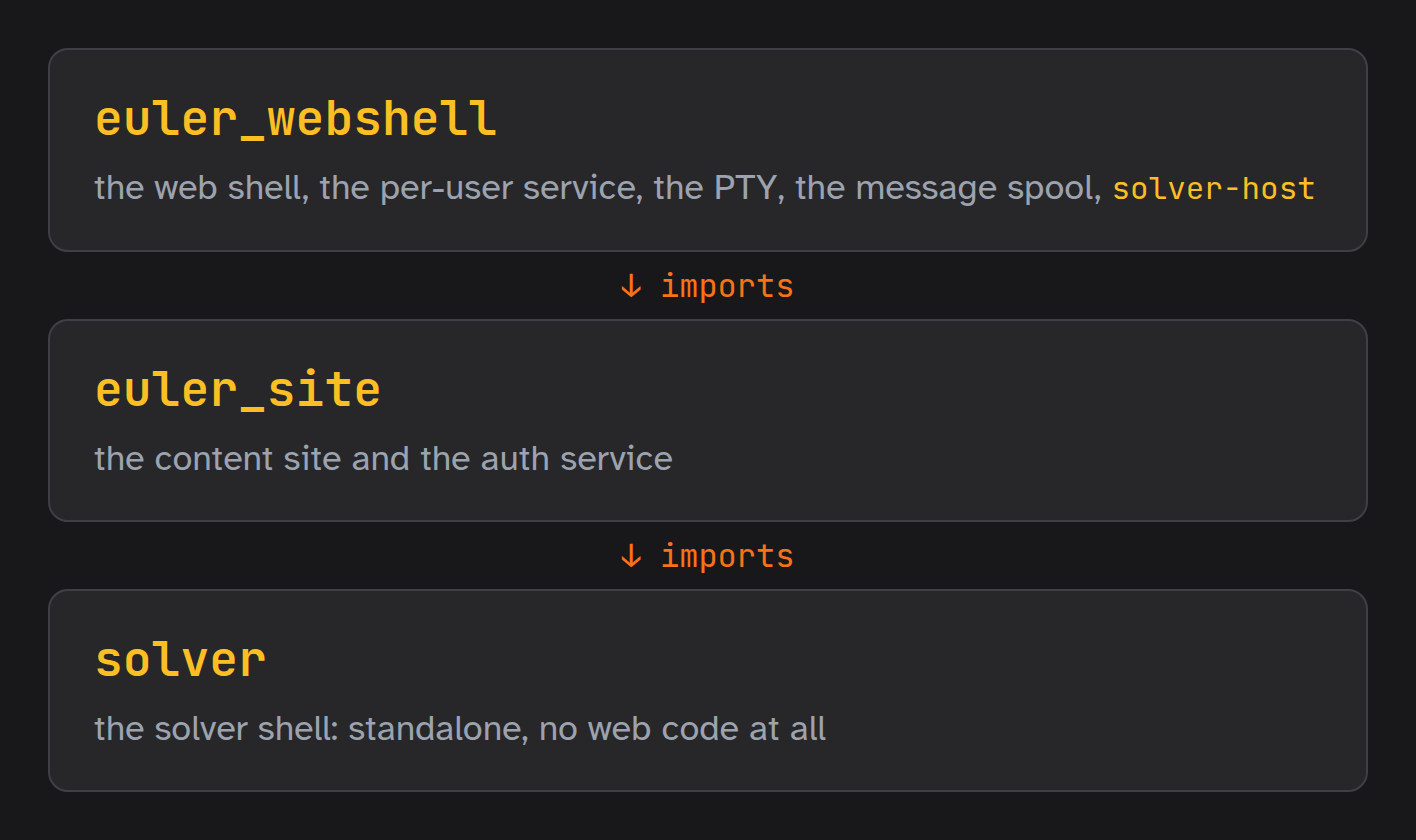
packages/solver/solver/           — euler-solver: the solver shell — standalone, no web code (docs/package-guide.md § 1).
  __main__.py                     — Module entry point.
  main.py                         — Entry point for the "solver shell" CLI.
  version.py                      — The solver build version — the single source of truth.
  ai/
    api.py                        — The `claude-api` command: generate solution artifacts (code / docs / test cases) via the Claude API.
    batch.py                      — The `claude-batch` command: bulk tag generation over the Message Batches API.
    code.py                       — Generate and re-document Project Euler solutions (Python and C) via the Claude API.
    docs.py                       — Module to generate notes for solver solutions, leveraging AI.
    facts.py                      — Utility function for gathering problem inputs for AI
    models.py                     — Available models and their pricing, plus a utility function to calculate costs.
    skill.py                      — The `claude`, `claude-login`, `claude-solve` and `claude-blog` commands: run Claude Code in-shell.
    update_models.py              — The `update-models` command: refresh the `Model` enum and its pricing.
    update_usd_rate.py            — The `update-usd-rate` command: refresh the USD→EUR reference rate.
  auth/                           — The authorization kernel — identity, profiles, and the ladder.
    authorizations.py             — The authorization policy — `authorizations.json`.
    identity.py                   — Identity resolution → a :class:`~solver.auth.subject.Subject`.
    subject.py                    — The authorization **subject** — the resolved security principal.
  config/                         — Configuration: `from solver.config import config` — the one way in.
    env.py                        — Reading `env.conf` — which environment variable carries each web-service setting.
    identity.py                   — Dynamic configuration: **who** this process is running as.
    paths.py                      — The two anchors every other path hangs off — and the one deliberate side effect.
    settings.py                   — The static configuration: every path and constant the solver reads, declared once.
    theme.py                      — Dynamic configuration: how the shell **looks**.
    values.py                     — Reading `values.conf` — the editable half of the configuration.
  core/
    download.py                   — Utility for downloading and caching files via HTTP.
    evaluate.py                   — Solution evaluation: runs standalone scripts against test cases and reports results.
    git.py                        — Git and GitHub (gh) commands and helpers — the repository workflow.
    list.py                       — List solution directory contents.
    listing.py                    — Which of a problem's files a listing shows — shared by `ls` and the site's files table.
    new.py                        — The `new` command and solution-file formatting (black / isort / autoflake).
    notices.py                    — Notices: what a command tells the people who act on it — through whatever carries it.
    problems.py                   — The Problem model plus the projecteuler.net problem scraper and on-disk cache.
    progress.py                   — The progress page → `problems.json` pipeline, shared by the shell and the web tier.
    results.py                    — Results: save and retrieve problem results.
    summary.py                    — The `summary`, `progress` and `mark` commands: the shell's side of `problems.json`.
    tags.py                       — Tag/blog glue: the `blogs`, `blog` and `update-tags` commands.
    test_cases.py                 — Load test cases for evaluation
    viewer.py                     — Open a problem or its files in the web front end: the `show` and `edit` commands.
  crypto/
    ciphers.py                    — Ciphers: read keys from disk and lock/unlock, encrypt/decrypt with no user interaction.
    gitfilter.py                  — Transparent git clean/smudge encryption for tracked solution files.
    keys.py                       — Cipher key management: create, persist, rotate and share the crypto key material.
    readenv.py                    — Print the authoring env (`~/.euler/env`) as plaintext — the setup scripts' reader.
    vault.py                      — The per-user vault: envelope encryption that makes a user's secrets opaque to the operator at rest.
    wire.py                       — The crypto wire formats: what two clones must agree on, byte for byte.
  runners/
    runner.h                      — Runner framework for Project Euler solutions with benchmarking and validation.
    runner.py                     — Runner framework for Project Euler solutions with benchmarking and validation.
  shell/                          — Shell framework (prompt-toolkit + rich): the readline → lexer → parser → interpreter pipeline.
    bash.py                       — The `!` (`sh` / `bash`) built-in command: run a bash command in the current
    builtins.py                   — Built-in framework commands for shell v2: echo, clear, help.
    command.py                    — Command framework for shell v2: Context, Command, registry, and decorator.
    dialogue.py                   — Every question the shell asks: one interaction model, in one place.
    docstring.py                  — Reading a command's docstring: the shape both `?` and `check-commands` rely on.
    extension.py                  — Extensions: how a package built on the solver shell adds to it, without the shell knowing.
    interpreter.py                — Interpreter for shell v2: execute the parser's statements.
    lexer.py                      — Lexer for shell v2: syntax-check a command block and normalise it.
    login.py                      — Login: who the session runs as, and whether its vault is open — settled before any command.
    parser.py                     — Parser for shell v2: canonical form (the lexer's output) → typed statements.
    register.py                   — The `@register` decorator: register a function as a shell command with type-safe coercion and completion.
    session.py                    — Session capture: tee shell output and typed input to a plain-text log file.
    shell.py                      — Interactive shell for v2: readline → lexer → parser → interpreter.
    tty.py                        — Terminal I/O: the shared rich console, the prompt-toolkit session, and the command-block reader.
    variables.py                  — Variable store for shell v2.
  templates/
    engine.py                     — Template rendering: the Templates enum and string.Template engine with shared prompt/solution vars.
    new.c                         — Solution to Euler $problem.
    new.py                        — Solution to Euler $problem.
  utils/
    doclint.py                    — The `check-commands` command: hold every command docstring to the documented standard.
    linter.py                     — Utilities for linting code.
    loader.py                     — Utility for loading command modules.
    misc.py                       — The `problems` command.
    path_utils.py                 — Utility functions for file and directory operations.
    presentation.py               — The `update-presentation-data` command: refresh the presentation deck's data file.
    quips.py                      — The regenerating verbs' commit subjects — one pool per verb, in one place.
    scripts.py                    — Dependency, system-resource and per-user tool setup commands.
    search.py                     — 'find' command: grep the solution stack for a regular expression.
    shell_utils.py                — Utility for running shell commands and capturing their output.
    update_doc.py                 — Regenerate the machine-maintained sections of the guides under `docs/`.
    version.py                    — The `version` command: report the running solver build's version.
packages/site/euler_site/         — euler-site: the content site and the auth service (docs/package-guide.md § 1, docs/web-server-guide.md).
  assets.py                       — Versioned asset URLs: `/assets/site.css?v=<hash>` — a URL that names its own bytes (shared).
  cache.py                        — Cache-Control middleware: what a browser may reuse, and for how long (shared).
  csp.py                          — Content-Security-Policy middleware with a per-response nonce (shared).
  envfile.py                      — Minimal `KEY=VALUE` reader for the scoped runtime env files under `/etc/euler`.
  store.py                        — Shared JSON persistence and untrusted-text hygiene for the service stores.
  unixhttp.py                     — Minimal HTTP-over-unix-socket client, shared by the service tiers (stdlib only).
  version.py                      — The euler-site build version — in lockstep with `solver.version` (docs/package-guide.md § 5.2).
  auth/                           — Web authentication: the auth service and its clients.
    __main__.py                   — Auth service entry point: `python -m euler_site.auth`.
    admin.py                      — The admin-plane CLI: run **under sudo** by the `users` shell command.
    app.py                        — The auth service: public + admin aiohttp apps over unix sockets.
    client.py                     — HTTP-over-unix-socket client for the auth service — re-export of the shared one.
    config.py                     — Auth-service runtime configuration, read from the environment.
    mail.py                       — Outbound mail via the loopback relay.
    pages.py                      — The auth service's HTML pages: login, registration, reset, forgot.
    pending.py                    — Pending invite / reset store at `<state>/pending.json`.
    policy.py                     — Auth policy constants (lifetimes, cookie names, password and OTP rules).
    pow.py                        — Proof of work for the unauthenticated forms that make the service send mail.
    ratelimit.py                  — A small in-memory sliding-window rate limiter for the auth endpoints.
    remember.py                   — Persistent "remember me" tokens at `<state>/remember.json`.
    requests.py                   — Prospective-collaborator invite requests at `<state>/requests.json`.
    returnto.py                   — Where a sign-in or a sign-out returns to: the page the reader was on.
    sessions.py                   — In-memory web session table.
    srp.py                        — Secure Remote Password (SRP-6a) primitives for web authentication.
    storage.py                    — JSON persistence for the auth stores — re-export of the shared implementation.
    tickets.py                    — One-time shell tickets: web identity for PTY children.
    users.py                      — User store: the SRP verifier database at `<state>/users.json`.
  site/                           — The content service — server-rendered pages + htmx fragments.
    __main__.py                   — Content service entry point: `python -m euler_site.site`.
    app.py                        — The content service aiohttp app: identity from forward_auth, routes, gating.
    code.py                       — The code viewer: the project's own source, browsable on the public site at `/code/`.
    config.py                     — Content-service runtime configuration, read from the environment.
    content.py                    — Config-free readers for the content trees the service renders.
    gitstate.py                   — The header chip's git state: three reads of this user's clone, by need.
    icons.py                      — The account icon: what a signed-in user wears on the account page and in the header.
    render.py                     — The full-page-vs-block render contract (§4.5).
    validate.py                   — The save gate: the checks every write passes.
packages/webshell/euler_webshell/ — euler-webshell: the solver shell, extended for the browser and the web host (docs/package-guide.md).
  logout_all.py                   — Sign every web user out ahead of a shutdown: run **under sudo** by `logout-all` and `make logout-web`.
  roster.py                       — The collaborator roster — `/etc/euler/roster/users.json`.
  users.py                        — The `users` shell command: account administration for the operator.
  version.py                      — The euler-webshell build version — in lockstep with `solver.version` (docs/package-guide.md § 5.2).
  msg/                            — The message spool: user↔staff threads, on its own uid (web-server-guide § Messaging).
    __main__.py                   — Message service entry point: `python -m euler_webshell.msg`.
    admin.py                      — The message admin plane CLI: run **under sudo** by the `msg` shell command.
    app.py                        — The message service: public + admin aiohttp apps over unix sockets.
    client.py                     — The shell tier's client for the message spool: one call, whichever plane answers.
    commands.py                   — The `msg` shell command: read and write the message spool.
    config.py                     — Message-service runtime configuration, read from the environment.
    identity.py                   — Who is calling: `SO_PEERCRED` → login → identity → profile.
    notify.py                     — Send a message **from a command** — the message layer's actual purpose.
    store.py                      — The message spool at `<state>/messages.json` — messages and read-state.
  shell/                          — The web shell: the solver shell, extended for a PTY framed by the browser.
    __main__.py                   — Web shell entry point: `python -m euler_webshell.shell` — what the per-user service's PTY runs.
    host.py                       — Host terminal entry point: `python -m euler_webshell.shell.host` — what `solver-host` runs.
    identity.py                   — The web shell's identity: a one-time shell ticket, redeemed at the auth service.
    keys.py                       — Key distribution: issuing the master key over the message spool and by mail.
    logout.py                     — The `logout` shell command: sign out of the web session from the terminal.
    notices.py                    — The message spool as the carrier of the solver shell's notices (:mod:`solver.core.notices`).
    osc.py                        — The shell → browser control channel: `OSC 5379`.
    viewer.py                     — The web shell's `show` and `edit`: swap the app shell's left pane instead of opening a tab.
  user/                           — The per-user web service: one collaborator's content **and** web shell.
    __main__.py                   — Per-user service entry point: `python -m euler_webshell.user`.
    app.py                        — The per-user aiohttp app: one collaborator's content **and** web shell.
    config.py                     — Per-user service runtime configuration, read from the environment.
    logout.py                     — The shutdown notice: one instance's countdown to closing its shell (`logout-all`).
    msg_api.py                    — The header's message chip for the per-user service (web-server-guide § Messaging).
    vault_api.py                  — Vault + account routes for the per-user service.
  ws/                             — The web-shell service: the solver PTY terminal over WebSocket.
    __main__.py                   — Web-shell service entry point: `python -m euler_webshell.ws`.
    app.py                        — The web-shell aiohttp app: identity from forward_auth, the /ws attach, teardown.
    config.py                     — Web-shell service runtime configuration, read from the environment.
    manager.py                    — Persistent per-user PTY shells: one long-lived solver shell per web user.
    pty.py                        — PTY bridge: run an interactive `solver` shell on a pseudo-terminal.
packages/content/euler_content/   — euler-content: the published content, packaged — what the public site serves to signed-out visitors.
Every shell command is a plain Python function decorated with @register(...)
(defined in packages/solver/solver/shell/register.py, re-exported from solver.shell). The decorator handles
shlex tokenisation, type coercion (Literal / bool / int / Optional), and tab-completion;
commands are collected at import time, and packages/solver/solver/modules.csv lists the modules loaded
on startup. Framework built-ins (echo, clear, ?, !) are registered the same way
from shell/builtins.py and shell/bash.py. The full contract is documented in
the Developer Guide.
Every command returns an int exit code (0 = success), so the shell composes them into command
blocks - ; (sequential), && (on success), || (on failure), and { … } groups - through the
lexer → parser → interpreter pipeline. loop, break / continue / exit, {name} variables, and
side-effect-free expressions are language constructs (not commands); solver <cmd> exits with the
block's status. The language is specified end-to-end in
docs/syntax.md.
License
This project is licensed under the MIT License. See the LICENSE file for details.
Third-party dependencies
The framework's Python dependencies are declared per package (packages/*/pyproject.toml): the
solver's optional groups (solutions, show, ai, dev) and the web tier's two packages are
summarised under Requirements above - install only what you need.
The web front end bundles its JavaScript/CSS assets locally so it runs fully offline, with no CDN
calls. These vendored assets live under packages/site/euler_site/content/vendor/ - xterm.js (MIT),
highlight.js (BSD-3-Clause), CodeJar (MIT), MathJax (Apache-2.0), and Devicon (MIT). Each is
redistributed under its permissive license; the full license texts and an inventory of every file
are in the vendor README.
Authors
Vikas Munshi - vikas.munshi@gmail.com If a problem catches your eye, or you want to collaborate on the encrypted ones, feel free to reach out. Curiosity is always welcome and fun.
Claude (Anthropic) - pair-programmed the solver framework and AI integration from inside its own shell.